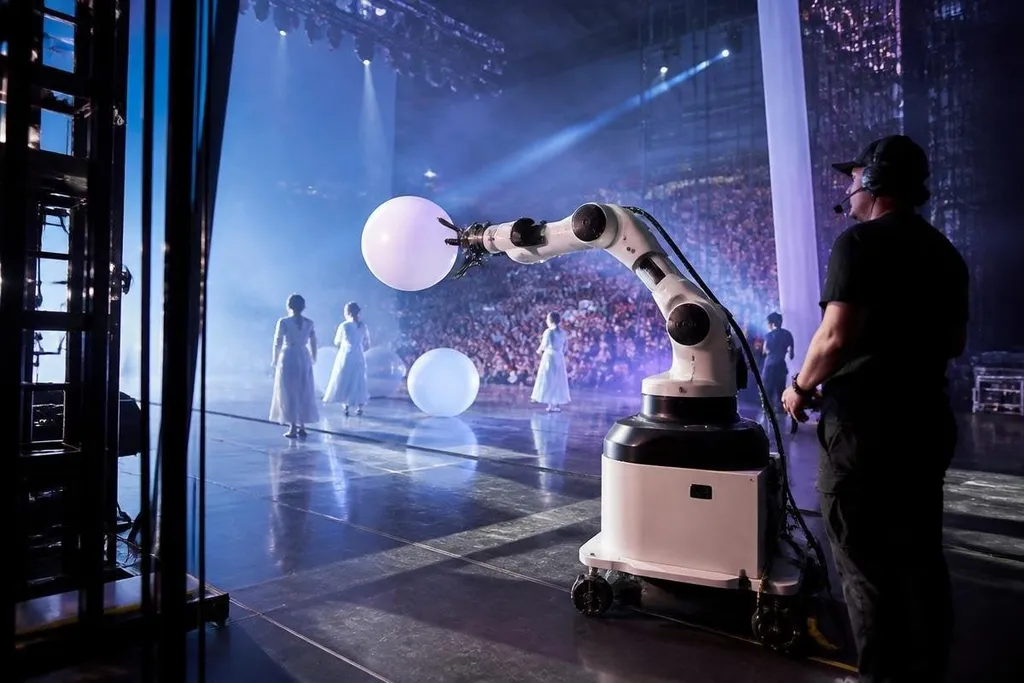
A live robot can wave at a crowd, carry a prop, guide visitors, or perform the same timed motion for every show. That repeatability is changing where robots fit in entertainment: they can handle planned actions while people manage the parts that need judgment.
Quick read
- Animatronics repeat a programmed performance; teleoperated robots respond to a human controller.
- Cameras, LiDAR, and force sensors help robots work near guests, but they don't remove safety limits.
- The best use is a clear stage task with a known path, timing, and backup plan.
Motion that stays on cue
Live shows depend on timing. A performer may need to raise an arm when music starts, turn toward a marked spot, or move a prop at the same point in each scene. The machine can repeat those motions through motors, control software, and position sensors.
That consistency helps a production team plan lighting, sound, camera angles, and actor movement around the robot. It also makes rehearsal easier because the robot follows the same programmed path each time, provided its sensors and mechanical parts work as expected.
The machine still needs a person to set limits, check the motion, and stop the system when conditions change. A move that repeats safely on an empty stage may need a different speed near guests or performers.
Three ways robots work in entertainment
The word “robot” covers several very different stage tools. Their control method matters more than their shape.
Animatronic figures use motors, cables, pneumatic systems, or hydraulic parts to create planned movement. They suit characters that stay in one area, such as a creature in a theme-park scene or a figure in a museum display. Their actions can look natural when the mechanism has enough degrees of freedom, meaning enough separate joints to shape the motion.
Teleoperated robots have a human controller. The operator may use cameras, hand controls, or a full control rig to move the robot and respond to the crowd. This setup gives the show more room for live reactions, but it also adds a person who needs a clear view, reliable communication, and practice with the machine.
Mobile robots move through the venue under software control or with help from an operator. Cameras and LiDAR, a sensor that measures distance with light, help the robot map nearby objects and avoid blocked paths. A mobile robot might carry a camera, deliver a small prop, or lead a visitor group along a planned route.
What changes for the crew
Robots shift work rather than remove it. A stage technician may spend less time repeating a physical action and more time checking motors, cables, batteries, software, and emergency stops. The venue also needs a plan for charging, storage, transport, and repairs between shows.
That work becomes visible during a live event because a stuck wheel or failed sensor can stop a scene. The production team needs a manual backup, a safe parking position, and a person who can reach the stop control quickly.
A crowd changes the test: a robot’s route, stopping distance, operator link, and recovery time affect people standing nearby. Those are the details to look for in Robot24.com: the machine, event date, and recorded result. The next section looks at the limits near a crowd.
The limits near a crowd
The system works in a controlled way only when its surroundings stay within the conditions its software can handle. Guests may step into its path, a cable may move, or a loud venue may make spoken commands hard to hear.
Bright lights can also affect cameras, while wireless interference can interrupt a remote control link. Physical design matters too. A rounded shell can reduce sharp edges, but it doesn't make a moving machine safe by itself.
Speed limits, restricted areas, padding, sensor checks, and a reachable emergency stop still matter. The unproven part is often the business case: a machine may draw attention during a launch event, but that does not show that it will keep working across a full season.
The team needs maintenance hours, repair costs, staff time, and ticket or visitor results before deciding to expand its use.
A practical buying checklist
Before adding a robot to a live experience, check these points:
- Define the action: write down the exact move, timing, location, and handoff the robot must perform.
- Map the people: mark guest paths, performer positions, barriers, and the place where the robot can stop safely.
- Test the link: run the control system with the venue's lights, speakers, wireless gear, and network in use.
- Plan the failure: decide who stops the robot, who clears the area, and what the show does next.
- Count the staff hours: include setup, charging, cleaning, checks, transport, and repairs in the cost.
- Set a trial measure: record missed cues, stops, repair time, and guest response during a defined run.
I'd skip a robot that has no clear task beyond standing near a crowd. A machine earns its place when its movement, control method, and backup plan fit the show.
The next useful test is a full run under venue conditions, with guests nearby and every stop recorded. That result will tell a production team more than a polished demonstration.